

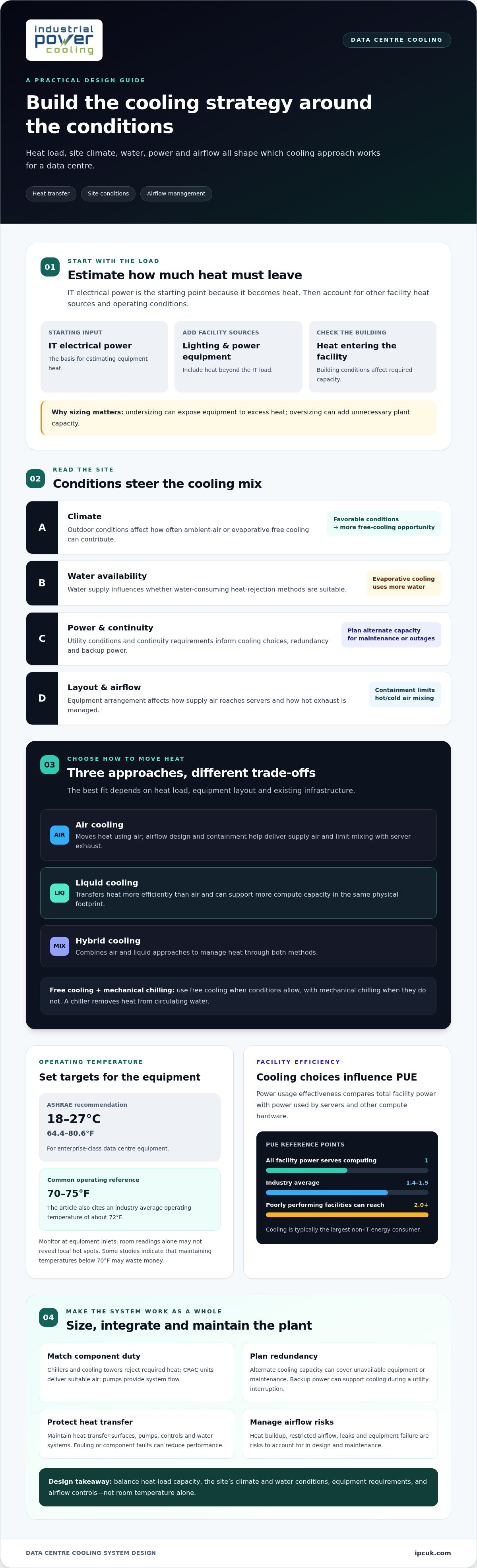
Effective data centre cooling system design isn’t simply about moving more air. A data centre cooling system removes heat from IT equipment and carries it away from servers and the facility using air, liquid, or both. Each approach manages heat differently, while containment helps prevent hot exhaust and cold supply air from mixing.
Cooling helps maintain equipment performance and reliability, but lowering the room temperature alone won’t fix poor airflow or a mismatch between the cooling method and the heat load. The right approach depends on the equipment layout, operating conditions, and existing cooling infrastructure.
This guide compares air, liquid, and hybrid cooling, then explains how rack-level systems and hot-aisle or cold-aisle containment fit into the design. You’ll learn how each method moves heat, its practical advantages, and which facility factors shape an efficient cooling strategy.
Key Takeaways
- Choose cooling around the facility’s heat load, layout, climate, water availability, and power conditions rather than assuming one method suits every data centre.
- Compare air, liquid, and hybrid approaches by how they transfer heat, support equipment density, and affect facility requirements.
- Understand how chillers and free-cooling methods can work together to manage heat under different operating conditions.
- Use airflow management and hot- or cold-aisle containment to limit the mixing of supply air and server exhaust.
- Assess dry coolers, chillers, and cooling skids as potential components when planning or refining an industrial cooling system.
What are Data Center Cooling Systems?
Data centre cooling systems remove heat from computing equipment and transfer it outside the facility. Their design connects chillers, heat-rejection equipment, pumps, and airflow controls to the facility’s operating requirements.
Chiller Technologies and Free-Cooling Methods
A chiller removes heat from circulating water, while free cooling uses favorable outdoor conditions to reduce mechanical cooling demand. This distinction matters because climate, water availability, and the heat-rejection method all influence how the system operates.
Free cooling can use low-temperature ambient air, thermal reservoirs, or evaporating water. Evaporative cooling can reject comparable heat to air cooling while using significantly less energy, but it consumes more water. A hybrid arrangement can use free cooling when conditions allow and mechanical chilling when they do not.
U.S. permitting depends on local requirements for building, mechanical, electrical, fire, and water systems. ASHRAE recommends an operating range of 18°C to 27°C (64.4°F to 80.6°F) for enterprise-class data center equipment.
Cooling Capacity and Heat-Load Calculations
Cooling capacity is the rate at which heat must be removed to keep equipment and facility conditions within operating limits. To estimate a data centre’s heat load, start with IT electrical power, which becomes heat, then account for other facility heat sources and operating conditions.
This calculation matters because undersizing can expose equipment to excess heat, while oversizing can add unnecessary plant capacity. IT load is only a starting point: lighting, power equipment, and heat entering through the building also affect the required capacity.
Typical U.S. design costs depend on facility scale, equipment, redundancy, and site integration. The project price is provided after a quote request, with the scope shaped by those factors.
Equipment Sizing and System Redundancy
Equipment sizing matches each component’s duty to the calculated heat load and system operating conditions. Chillers and cooling towers must reject the required heat; CRAC units must deliver suitable air to equipment, and pumps must provide the flow needed through the system.
Redundancy provides alternate cooling capacity when equipment is unavailable or needs maintenance. The appropriate arrangement depends on continuity requirements, equipment configuration, and potential failure scenarios. Backup power can support cooling equipment during a utility interruption.
Risks include heat buildup, restricted airflow, leaks, and equipment failure. Maintenance should cover operating condition, heat-transfer surfaces, pumps, controls, and water systems, since fouling or component faults can reduce cooling performance.
Climate, Water, and Utility Considerations
Local climate affects how often ambient-air or evaporative free cooling can contribute, while water availability shapes the suitability of water-consuming heat-rejection methods. Utility conditions also matter because cooling is typically the largest non-IT energy consumer in a data center.
These factors guide the balance between mechanical chilling, free cooling, and heat-rejection equipment. A design for a cool, water-constrained site may prioritize ambient conditions differently from one for a hot site with available water. In both cases, data centre cooling system design must match local operating conditions.
Temperature targets also affect energy use: the generally recommended data center range is 70°F to 75°F (21°C to 24°C), and some studies indicate that maintaining temperatures below 70°F (21°C) may waste money.
Energy-efficient data center cooling
Efficiency depends on both the cooling plant and the conditions it serves. Assess temperature control, airflow, and facility power use together, rather than treating them as isolated design choices.
Recommended Data Center Temperatures
Recommended temperatures define the operating conditions cooling equipment must maintain, helping balance energy use with reliable IT operation. The typical average operating temperature across the industry is about 72°F. Many equipment manufacturers design equipment to run above 70°F, and some allow cold aisles at 80°F or higher. These allowances make equipment specifications important when setting facility targets. ASHRAE recommends 18°C to 27°C (64.4°F to 80.6°F) for enterprise-class equipment.
Setting temperatures below 70°F may waste money, according to some studies. Operators should distinguish the temperature at equipment inlets from general room readings, since airflow patterns can create local hot spots. A sensor showing 72°F in one area doesn’t establish that every rack receives suitable conditions. Aligning monitoring points with equipment locations gives operators a clearer basis for adjustment.
Cooling Technologies for Energy Efficiency
Energy-efficient cooling uses equipment and controls to remove heat while limiting facility energy demand. Power usage effectiveness, or PUE, compares total facility power with power used by servers and other compute hardware. A PUE of 1 means all facility power serves computing, networking, and storage. Industry average PUE is 1.4 to 1.5, while poorly performing facilities can reach 2.0 or higher.
Cooling is typically the largest non-IT energy consumer, so its operating profile can materially affect PUE. Free cooling can use low-temperature ambient air, thermal reservoirs, or evaporating water. Evaporative cooling can reject comparable heat to air cooling while using significantly less energy, but it consumes more water. The choice depends on site conditions as well as energy performance.
Liquid cooling transfers heat more efficiently than air and can support more compute capacity in the same physical footprint, while reducing server-fan energy use. Two-phase immersion systems can achieve PUEs in the 1.02 to 1.03 range. These outcomes depend on the cooling architecture and facility integration, not simply the cooling medium.
Hot-aisle and cold-aisle containment separates cold supply air from hot exhaust, avoiding the energy cost of chilling air unnecessarily. Humidity control, facility airflow management, and real-time monitoring with industrial IoT can also inform operational adjustments.
A useful review starts by comparing facility power with IT power, then examining temperature readings and airflow at equipment locations. Local climate, water availability, and power conditions influence which cooling technologies are suitable. Data centre cooling system design should connect energy metrics with actual operating conditions, rather than treating a low temperature or PUE target as sufficient on its own.
Air, liquid, hybrid, and rack-level cooling
The main types are air cooling, liquid cooling, and hybrid systems that combine both. Rack-level cooling captures heat close to servers, while room-level air systems distribute cooling across a larger area.
Liquid Cooling
Liquid cooling carries heat away from server components through a circulating fluid, making it relevant where air alone cannot manage concentrated equipment heat. In direct-to-chip systems, cold plates contact heat-producing components, and coolant carries heat to a heat exchanger. The room still needs a way to manage other heat sources, including power equipment and residual server heat.
Immersion cooling takes a different approach: servers sit in a bath of dielectric fluid, which absorbs heat from components. The fluid then transfers that heat through a heat-rejection system. Direct-to-chip and immersion designs differ in how they contact equipment, so facility layout, service access, and server compatibility shape the choice.
Liquid circuits also introduce pipework, pumps, connections, and leak-management considerations. For example, a direct-to-chip installation must route coolant to each served rack and return warmed fluid for heat rejection. The cooling architecture should account for both IT equipment and the facility systems that support it.
Hybrid Cooling
Hybrid cooling combines air and liquid methods within one facility, allowing each to manage the heat sources it can serve. This can be useful when a data hall contains both conventional servers and equipment with concentrated component heat. Liquid may capture heat at selected processors, while air handles residual heat and equipment outside those cooled circuits.
For example, a rack row could use direct-to-chip cooling alongside room air distribution. The liquid loop handles heat from connected components, while air continues to circulate and support other equipment. This arrangement requires coordination between coolant supply, air delivery, controls, and heat rejection.
Hybrid systems can also combine mechanical cooling with free-cooling operation when outdoor conditions allow. The operating mode changes with available conditions, but the system must manage heat continuously. Designers consider how the equipment works together rather than treating air and liquid systems as independent installations.
Rack-Level Cooling
Rack-level cooling captures or supplies cooling close to an individual rack instead of relying only on room-wide distribution. It matters when rack heat loads vary across a data hall. For example, a row of high-density computing may need a different cooling response from neighboring racks with conventional server layouts.
In-row cooling units draw warm air near the racks and return conditioned air locally. Rear-door heat exchangers remove heat from server exhaust as it leaves the rack. Both approaches bring heat capture closer to its source, but still depend on facility systems to reject the collected heat.
Rack-level equipment must suit the rack arrangement, service clearances, airflow paths, and any liquid connections. Operators should assess how a unit affects server access and how its controls interact with room cooling. This local approach can complement broader air or liquid systems, but it does not eliminate the need to manage the data hall’s total heat load.
Hot-aisle and cold-aisle containment
Containment separates the cold air supplied to server fronts from the hot exhaust leaving server backs. In a cold-aisle arrangement, servers face a shared supply aisle; in a hot-aisle arrangement, their exhaust sides face one another. This separation limits mixing and avoids spending energy chilling air unnecessarily.
Cold-aisle containment encloses the supply-air zone, commonly using doors at aisle ends and panels overhead. Perforated floor tiles or overhead ducts deliver conditioned air into this enclosed space. Server fans draw in the air and discharge it warmer into the room. For example, open ends on a rack row can let cold supply air escape before it reaches server inlets.
Hot-aisle containment instead encloses the exhaust zone. Server backs discharge heated air into the contained aisle, where return grilles or ductwork carry it toward cooling equipment. This arrangement can suit facilities with overhead return paths. A gap above a rack or an unsealed cable opening can, however, let hot exhaust spill into the room and undermine separation.
Neither arrangement works through barriers alone. Rack blanking panels close unused spaces between servers, limiting air recirculation through empty rack positions. Brush grommets or sealed cable openings can reduce bypass paths beneath racks. Missing blanking panels, for instance, may let hot exhaust loop around equipment instead of following the intended return path.
Airflow direction must match the physical layout. Supply grilles should be positioned where server inlets can draw air, while return openings should collect exhaust without pulling supply air directly back. A commissioning review can trace airflow at each rack, inspect door seals, and identify obstructions such as bundled cables blocking a perforated tile.
Containment also affects access and operational routines. Doors and removable roof panels need to accommodate server installation, maintenance, and cable work. Changes to a rack row, such as adding equipment or moving a cable tray, can create gaps that alter airflow. Include barrier and seal checks in routine facility inspections.
Temperature sensors near server inlets help show whether containment delivers supply air consistently. A room-level reading can miss a localized hot spot behind a poorly sealed panel. Comparing inlet readings across racks with cooling-unit return conditions can help identify bypass air, blocked supply, or mixing between aisles.
Containment is an airflow-control measure, not a substitute for adequate cooling capacity. Its performance depends on continuous separation, correctly positioned supply and return paths, and rack-level details such as blanking panels. A well-sealed aisle gives cooling equipment a clearer route to supply cold air and collect server exhaust.
Air cooling
Air cooling removes heat by moving conditioned air through server equipment and returning warmed air to cooling units. Fans, supply paths, server inlets, and return paths must work as one system. If supply air bypasses a rack or hot exhaust recirculates into its inlet, equipment can experience uneven conditions even when the room average seems suitable.
Room-based systems commonly use computer room air conditioners (CRACs) or computer room air handlers (CRAHs). A CRAC uses a refrigeration circuit to cool air, while a CRAH typically cools air with chilled water passing through a coil. Both circulate air through the data hall, but differ in their cooling source and connection to facility equipment.
Air distribution may use raised-floor plenums, overhead ducts, or direct discharge from cooling units. Perforated floor tiles deliver supply air beneath racks, and their placement and any obstructions affect where it reaches. For example, a cable bundle blocking a tile can redirect airflow, leaving a rack inlet short of supply while nearby areas receive excess air.
Server fans draw cold air through equipment and discharge heated air into the room. Hot-aisle and cold-aisle layouts help preserve this intended path, while blanking panels close empty rack spaces that can permit bypass. Many equipment manufacturers allow cold aisles to be kept at 80°F or higher, making equipment requirements relevant to temperature targets.
Air cooling suits facilities where room airflow can carry equipment heat to cooling units. Its performance depends on supply temperature, airflow volume, rack arrangement, and the return path to the cooling coil. As equipment density rises in a particular row, available air may not reach every inlet evenly. Operators can use inlet readings and airflow checks to find restrictions or recirculation.
Filters and coils need attention because accumulated dust can obstruct airflow or reduce heat transfer. Fans, dampers, condensate management, and control sensors also affect operation. A maintenance inspection can assess filter condition, coil cleanliness, fan operation, and whether supply and return paths remain clear after rack or cable changes.
Air cooling can be integrated with chilled-water or evaporative heat rejection, depending on the facility’s wider plant and local conditions. The key design task is matching air delivery to server intake locations, then providing a reliable return path for exhaust. For an engineering discussion of cooling requirements, review your cooling system options.
Industrial Power Cooling (IPC): Dry Coolers
Industrial Power Cooling (IPC) supplies dry coolers for projects assessing how to reject heat from a circulating fluid without relying on evaporative heat rejection. A dry cooler transfers heat from the fluid to outdoor air, so its role depends on the system’s heat load, operating conditions, and site climate.
Where a data centre uses a fluid circuit, dry coolers may form part of the wider heat-rejection arrangement. IPC also supplies chillers and cooling skids for projects that require these components. The right equipment configuration depends on how the cooling plant and facility are designed to work together.
For a discussion about dry coolers and industrial cooling requirements, contact Industrial Power Cooling (IPC).
Plan the Next Cooling Design Review
The next step is to turn operational priorities into a coordinated engineering brief. Set out the facility’s heat profile, equipment layout, available utilities, and plans for future expansion. This gives the design review a practical basis for assessing how cooling equipment and site infrastructure need to work together.
Data centre cooling system design also needs to account for interfaces between components, including heat rejection, fluid circuits, controls, and installation requirements. Industrial Power Cooling (IPC) supplies dry coolers, chillers, and cooling skids for industrial cooling applications. These can form part of a project’s wider equipment requirements, without assuming that one configuration suits every facility.
Bring your project requirements into a technical discussion with Industrial Power Cooling (IPC). A structured review can help clarify the equipment scope and the next engineering decisions. With the operating conditions and project constraints clearly defined, you can move forward with a more informed cooling strategy.
Frequently Asked Questions
What does the future hold for data center temperature management?
Temperature management is likely to put greater emphasis on adapting cooling to changing workloads and equipment requirements. Operators can use operating data to identify where demand changes, rather than relying only on fixed room settings. For example, monitoring rack inlet conditions alongside workload shifts can reveal local changes that facility-wide averages miss. Designs should also leave room to integrate different cooling methods as computing hardware and heat loads evolve.
What temperature and humidity ranges should data centers maintain?
ASHRAE recommends 18°C to 27°C (64.4°F to 80.6°F) for enterprise-class equipment, while the generally recommended range is 70°F to 75°F (21°C to 24°C). Humidity should be managed according to equipment requirements and facility conditions, rather than assigned an unsupported universal target. For example, operators can assess humidity readings alongside inlet temperatures and condensation risk, then align control settings with the equipment’s stated operating limits.
How do hot aisle and cold aisle containment improve cooling efficiency?
Containment improves efficiency by keeping supply air from mixing unnecessarily with server exhaust. This helps cooling equipment deliver air where servers draw it and collect warmed air along its intended return route. For example, a facility investigating uneven rack inlet conditions can inspect containment boundaries, cable openings, and unused rack spaces. These details can reveal bypass paths that reduce the effectiveness of an otherwise suitable cooling setup.
How do air cooling and liquid cooling compare for data centers?
Air cooling distributes conditioned air through server equipment, while liquid cooling transfers heat through a fluid circuit. Air systems can serve equipment across a room, whereas liquid approaches can capture heat closer to selected components. A practical comparison also considers server compatibility, pipework routes, maintenance access, and how each system connects to facility heat rejection. A mixed environment may use both methods for different equipment.
What energy efficiency metrics apply to data center cooling, including PUE and WUE?
PUE compares total facility power consumption with the power used by servers and other computing hardware; a value of 1 means all facility power serves computing, networking, and storage. WUE relates facility water use to IT energy, helping operators consider water alongside electricity. For example, a site assessing evaporative heat rejection can review energy and water performance together, since lower energy use may involve greater water consumption.
What U.S. codes, ASHRAE standards, and permitting rules apply to data center cooling?
U.S. permitting depends on local requirements for building, mechanical, electrical, fire, and water systems. ASHRAE recommends an operating range of 18°C to 27°C (64.4°F to 80.6°F) for enterprise-class data center equipment.


